Showing posts with label Megaupload Hacks. Show all posts

Friday, September 21, 2007

Rapidshare file searcher download


Rapidshare does not allow its users to search the server for content; all files have to be downloaded by following a given URL.It is also one of the messiest and hard to work out sites.Goolge searching for rapidshare is also not effective because many links found by Google are already dead at Rapidshare and the overall process takes to much time.

Here are some alternatives to search and download files from rapidshare.Download free full version softwares,videos,porn movies,and latest full movie releases

Rapidsharing.net

The site lists available downloads from Rapidshare in eight categories including Software, Music and Games. A click on one item leads to a list of all available files in that category.

www.katz.ws . This search engine lists other webhost downloads as well.

www.rapidfox.net

www.rapidsharing.net

shareminer.com------------------Searches 12 file upload sites.

www.quicksearch.info------quick --------find rapidshare files

sharingengines.com

www.filestube.com - -----New rapidshare search engine

www.filecrop.com-------- You can view the size and others informations in the results page.

Related:

Fast way to get working proxy for Rapidshare

High speed downloads from rapidshare and Megaupload

Friday, September 14, 2007

High speed downloads from rapidshare and Megaupload


There are many users of rapidshare having the problem while downloading or uploading files from rapidshare or megaupload.

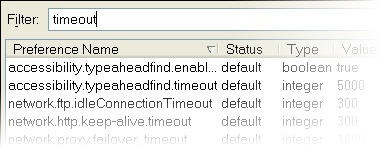
The main problem is "The Connection Was Reset" error which occurs due insufficient connection speed or due to explorer timeout.This problem could be solved by using firefox.Type about:config at the address bar of firefox.Find timeout using filter as shown.

about

Adjust timeout value "network.http.keep-alive.timeout" to a higher value and also the other similar values.By this higher range of download speeds could be obtained from any site without the connection reset.

time

Another method is by pinging the Dns servers.Find your Dns server by typing  "ipconfig/all" in the command prompt window.

Make a new .txt file and type exactly as given below with your "Dns server address"

@ping -t xxx.xxx.xxx.xxx

@pause

Here "xxx.xxx.xxx.xxx" denotes your ip address similar to "202.56.230.5" or something.Save it as "rapidsharehack.bat" which is a batch file and not a text file.

While downloading from rapidshare double click on rapidsharehack.bat which you just created.And enjoy high speed downloads

Related posts

Rapidshare.user.js download Latest Rapidhacker Download MegauploadHacks Latest Megaupload registry hack for IE August 2007 Rapidshare cookie hack

Sunday, August 19, 2007

Latest Megaupload registry hack for IE August 2007

This registry tweak will be clearly to you to download from megaupload.com without any time waiting.This just requires some Registry hack.No need to install the megaupload toolbar(bundled with spyware).

Download  the registry file given below and run it.It also works in Windows Vista.

DOWNLOAD:Megauploadhacktoolbar.reg

Restart IE for the changes to take place.

Related articles

Rapidshare.user.js download

Latest Rapidhacker Download

Megaupload Hacks

Saturday, August 11, 2007

Megaupload Firefox Hacks

Install FireFox 2 version.It is highly recommended to use the latest version
-Go to address bar and type about:config
-In Filter type general.useragent.extra.firefox and dont click show all
-From list doubleclick on general.useragent.extra.firefox and change the default text with Firefox/2.0 MEGAUPLOAD 1.0
-This will do for firefox 2 No need of the following hacks if you are using Firefox 2

For older versions
Megaupload Extension For Firefox
Get the Meagaupload extension to book download slots.This works with most versions of Firefox

Yet another Method
For older versions of FireFox
-Download and install the User Agent Switcher extension for FireFox.
-Restart the FireFox web browser after installation ended.
-Go to Tools -> User Agent Switcher -> Options.
-Then click on User Agents and then click on Add.
-Key in the following information:
Description: MegaUpload
User Agent: Mozilla/4.0 (compatible; MSIE 6.0; Windows NT 5.1; SV1; Alexa Toolbar)
-Exit by clicking on OK twice.
-Whenever you want to download from MegaUpload or SexUploader, go to Tools -> User Agent Switcher and select MegaUpload as FireFox’s temporary user agents.
-After downloading the files, you may want to switch back to original user agents, by selecting Default.

Blog Widget by LinkWithin

How to search rapidshare files ?

Search Rapidshare Files
RapidshareFiles.in -  Finds any file on rapidshare
www.rapidsharefiles.in